Sales Funnel Software for Small Businesses: How to Choose and Use the Right Tool
Small businesses do not need the most expensive funnel software to convert visitors into customers. They need a clear path from first touch to purchase, a tool the team can actually maintain, and a way to measure whether each step is working.
Sales funnel software can help, but only if the business already understands what it is selling, who it is selling to, and what action it wants the visitor to take. A beautiful landing page with no clear offer will not fix a weak product or an undefined audience.
Define the funnel job before choosing software
Before comparing tools, write down what the funnel must do:
- Capture leads from a specific traffic source (organic search, paid ads, social, referrals, events).
- Qualify leads with a form, quiz, or booking page.
- Present an offer with clear pricing and terms.
- Process payment or confirm a booking.
- Deliver the product, service, or onboarding sequence.
- Follow up for reviews, renewals, or referrals.
If the business only needs two of those steps, a full funnel platform may be overkill. If it needs all six, a dedicated tool will save time and reduce broken integrations.
Core features that matter for small businesses
Not every feature in a funnel platform is useful early. Focus on the ones that directly affect conversion and maintenance:
| Feature | Why it matters | When it becomes critical |
|---|---|---|
| Drag-and-drop landing pages | Lets the team build and edit pages without a developer | From day one; every funnel starts with a landing page |
| Form and opt-in builder | Captures emails, phone numbers, or qualification data | From day one; the form is the conversion point |
| Email automation and sequences | Follows up with leads who do not convert immediately | Within the first month; most visitors do not buy on the first visit |
| Checkout and payment processing | Closes the sale without sending the visitor to another site | As soon as the business sells a product or service online |
| Upsell and order bump tools | Increases average order value at the point of purchase | After the core offer is converting; do not optimize upsells before the main sale works |
| A/B testing | Compares headlines, offers, or page layouts with real traffic | After consistent traffic; testing with low volume produces misleading results |
| CRM or contact management | Keeps lead history, tags, and deal stages in one place | When the sales process involves follow-up calls, proposals, or multiple touches |
| Analytics and conversion tracking | Shows drop-off rates, revenue per visitor, and cost per acquisition | From day one; without data, the team is guessing |
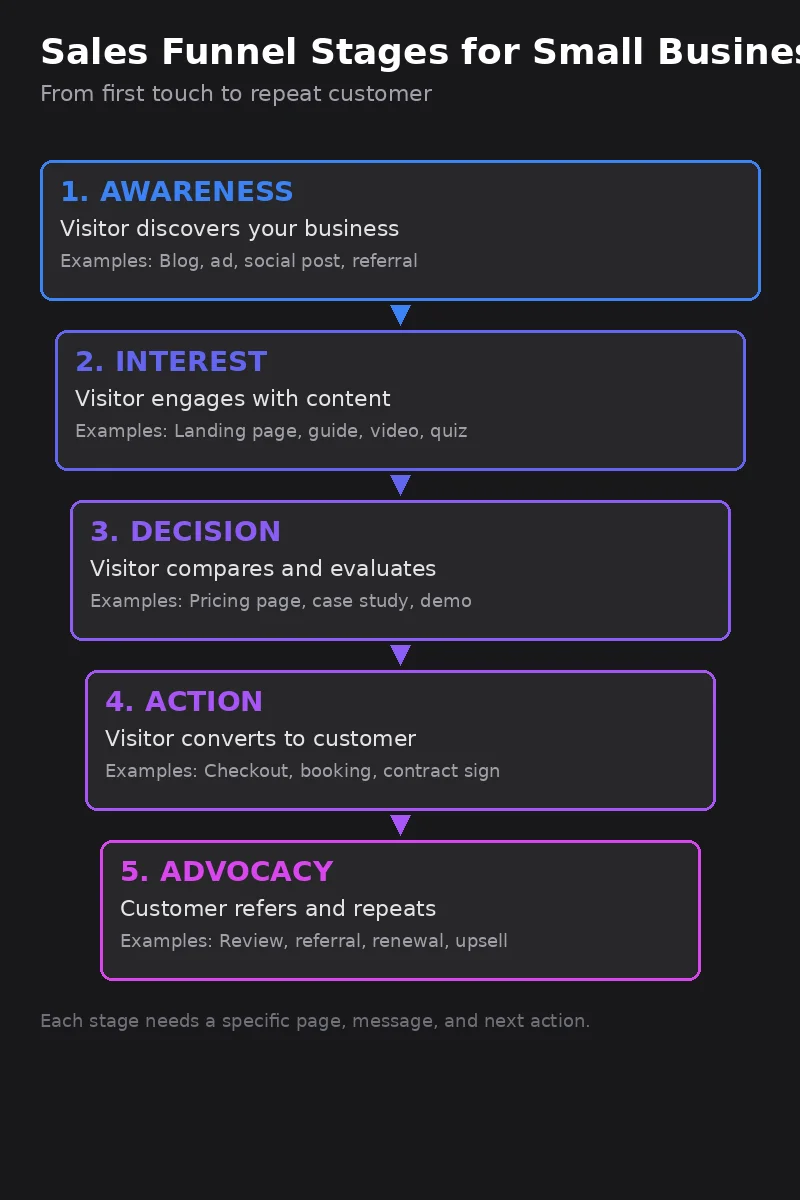
HubSpot explains that a sales funnel mirrors the path prospects take to become customers, with discrete stages from first touch to closed deal, and that the probability of closing changes as each deal moves through each phase (HubSpot Blog). That structure is what funnel software should support: not just a landing page, but a connected path with measurable stages.
Compare the main categories of funnel tools
Small businesses typically choose between three categories:
| Category | Examples | Best for | Trade-off |
|---|---|---|---|
| All-in-one funnel builders | ClickFunnels, Kartra, GrooveFunnels | Businesses that want landing pages, checkout, email, and membership in one platform | Monthly cost rises with scale; less flexible for custom integrations |
| CRM-first platforms with funnel features | HubSpot, ActiveCampaign, Keap, GoHighLevel | Businesses that need strong contact management, pipeline tracking, and automation alongside pages | Landing page builders may be less visual or template-rich than dedicated funnel tools |
| Composable stacks | WordPress + Elementor + WooCommerce + Mailchimp, or Carrd + Stripe + Zapier | Teams with technical skills who want full control and lower recurring costs | More setup time, more maintenance, more points of failure |
ActiveCampaign positions its Sales CRM as a pipeline automation platform designed for growth, with visual pipeline management, AI-powered lead scoring, and personalized automation workflows (ActiveCampaign). That makes it a strong fit for businesses that want funnel behavior inside a CRM rather than a separate funnel tool.
ClickFunnels focuses on the funnel mindset: attract, sell, upsell, ascend, and repeat. Its platform includes landing pages, checkout, email, courses, and community tools under one subscription (ClickFunnels). That breadth is useful for coaches, creators, and info-product businesses that need a complete customer journey without stitching tools together.
Choose based on business type and stage
The right tool depends on what the business sells and how mature the sales process is:
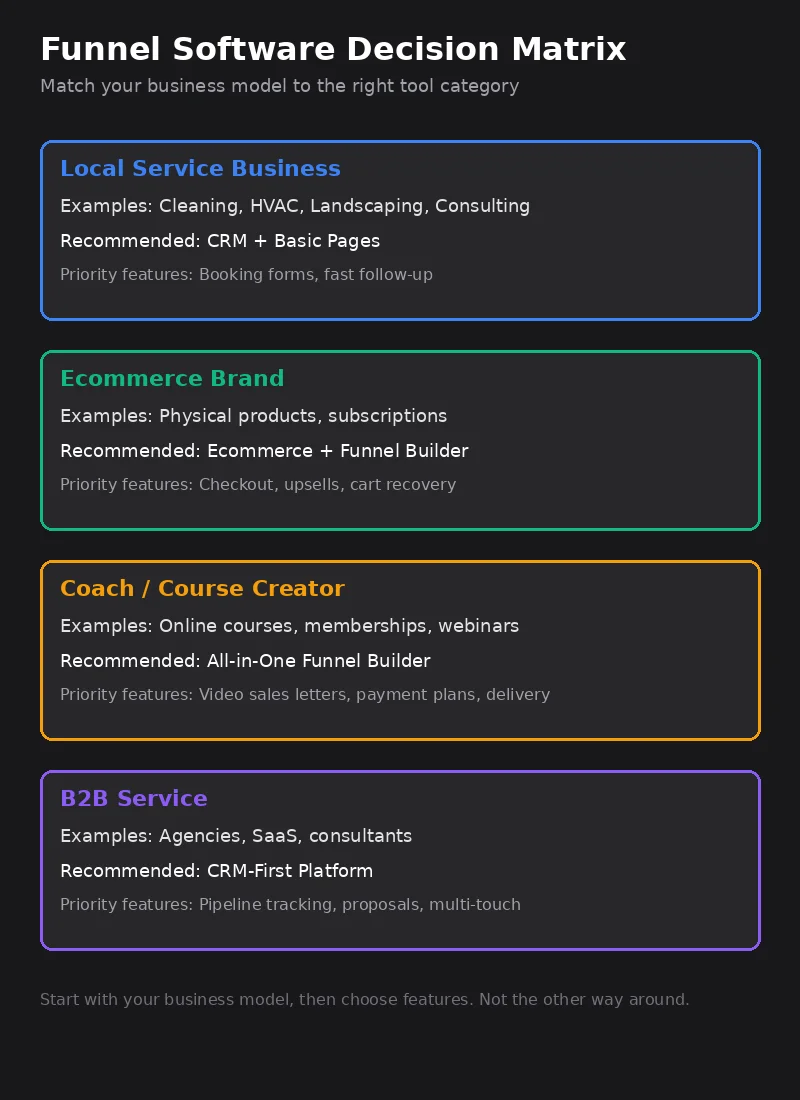
- Local service businesses (cleaning, HVAC, landscaping, consulting) usually need a simple landing page, a booking form, and fast follow-up. A CRM with basic page building and email automation is often enough.
- Ecommerce brands need checkout, upsells, and cart recovery. A dedicated funnel builder or a strong ecommerce platform with funnel plugins works better than a generic CRM.
- Coaches, consultants, and course creators need webinars, video sales letters, payment plans, and membership delivery. All-in-one funnel builders are built for this model.
- B2B services with long sales cycles need CRM pipelines, proposal tracking, and multi-touch sequences. A CRM-first platform is usually the better investment.
Watch for hidden costs and lock-in
Funnel software pricing can be misleading. Watch for these common traps:
- Contact limits: Entry plans often cap contacts or email sends. A list of 5,000 subscribers can force an upgrade even if revenue has not grown.
- Transaction fees: Some platforms charge a percentage on top of payment processor fees. That adds up quickly at scale.
- Template and feature tiers: A/B testing, affiliate management, or custom domains may be locked behind higher plans.
- Domain and hosting: Some platforms require using their subdomain on free plans, which looks less professional and hurts trust.
- Export limitations: If the business outgrows the platform, can contacts, pages, and funnels be exported cleanly? Some tools make migration difficult.
Read the pricing page carefully and model costs at 2x and 5x current volume before committing.
Build the first funnel around one offer and one traffic source
The most common mistake is building a funnel for every product and every channel at once. Start with one:
- One offer: the product or service with the clearest value and the shortest path to purchase.
- One traffic source: the channel that already produces visitors or the channel the business is willing to invest in first.
- One conversion action: book a call, buy a product, or request a quote. Do not ask for two things on the same page.
- One follow-up sequence: a short email series for visitors who do not convert immediately.
Once that funnel converts, replicate it for other offers or traffic sources.
Measure what matters
Funnel software produces a lot of data. Track only the metrics that drive decisions:
| Metric | What it reveals | Decision it drives |
|---|---|---|
| Traffic to landing page | Whether the traffic source is working | Scale, fix, or replace the traffic channel |
| Opt-in or form completion rate | Whether the offer and page copy are compelling | Rewrite the headline, change the offer, or simplify the form |
| Email open and click rates | Whether the follow-up sequence earns attention | Test subject lines, timing, or message content |
| Sales conversion rate | Whether the checkout process and pricing work | Adjust pricing, add guarantees, or reduce checkout friction |
| Average order value | Whether upsells and order bumps are effective | Add, remove, or reposition upsell offers |
| Customer acquisition cost | Whether the funnel is profitable | Increase budget, improve conversion, or pause the channel |
| Refund or chargeback rate | Whether the offer matches what is delivered | Fix product, clarify messaging, or tighten qualification |
If the landing page gets traffic but few opt-ins, the problem is the offer or the page. If opt-ins are high but sales are low, the problem is the follow-up, the pricing, or the checkout experience. Fix the weakest step before optimizing the others.
Avoid common funnel mistakes
Small businesses often break funnels in predictable ways:
- No clear call to action. Every page should ask for one specific next step. Multiple buttons, conflicting messages, or vague "learn more" links confuse visitors.
- Too many steps before the offer. Asking for name, email, phone, company size, and budget before showing a price creates friction. Collect only what is needed for the next step.
- Mobile-neglected design. Most funnel traffic is mobile. If the page is hard to read or the form is hard to complete on a phone, conversion collapses.
- No follow-up for non-converters. The majority of visitors will not buy on the first visit. Without an email sequence or retargeting, that traffic is wasted.
- Copy that describes instead of sells. Features matter, but benefits and outcomes matter more. The visitor should understand what changes for them after buying.
- Ignoring page speed. Slow-loading pages increase bounce rates. Compress images, minimize scripts, and test load times on real devices.
- Launching without testing. Test the full funnel yourself: click every link, fill every form, complete a test purchase, and check every confirmation email.
A practical 30-day rollout
Use the first month to prove one funnel works, then expand.
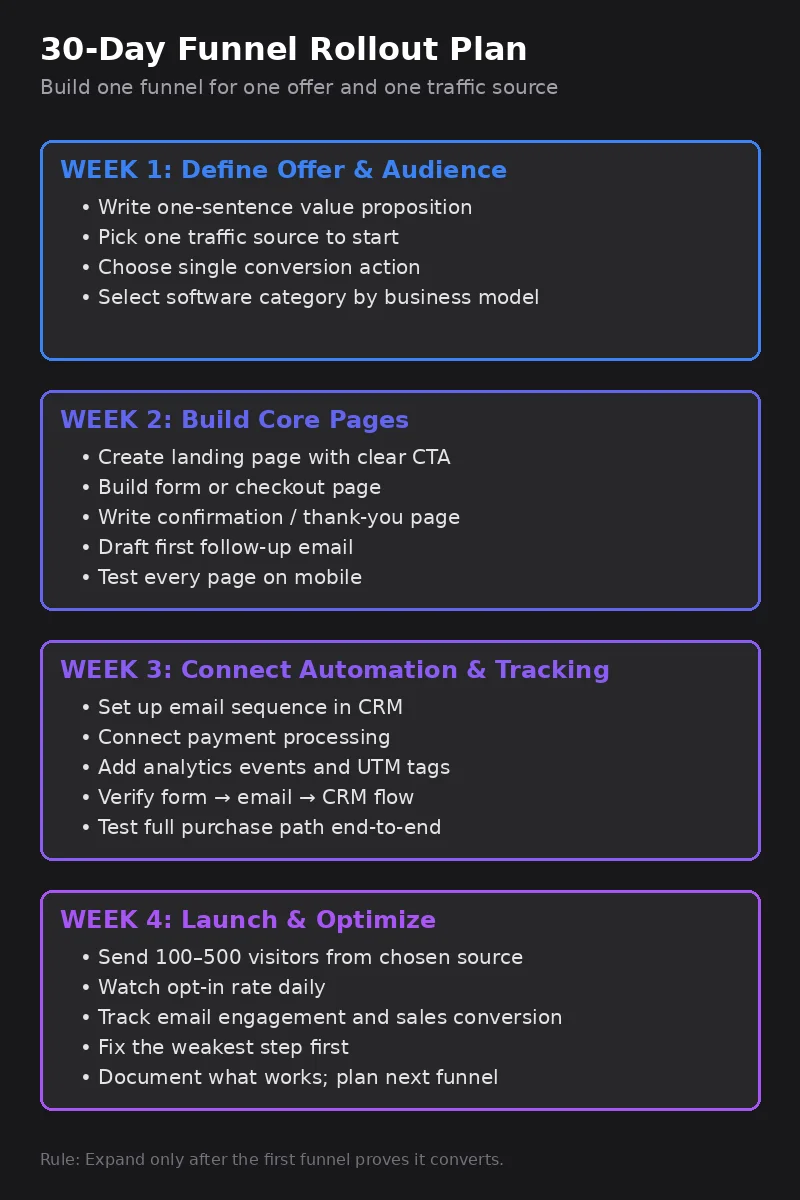
Week 1: Define the offer and audience. Write a one-sentence value proposition, identify the one traffic source to start with, and choose the single conversion action. Pick the software category that matches the business model.
Week 2: Build the core pages. Create the landing page, the form or checkout page, and the confirmation page. Write the first follow-up email. Test every page on mobile.
Week 3: Connect automation and tracking. Set up the email sequence, payment processing, and analytics events. Verify that form submissions trigger the right emails and that purchase events are tracked.
Week 4: Launch to a limited audience. Send 100–500 visitors from the chosen traffic source. Watch opt-in rate, email engagement, and sales conversion daily. Fix the weakest step. Document what works and plan the next funnel.
The bottom line
Sales funnel software is a tool, not a strategy. The best results come from businesses that know their customer, their offer, and their numbers, then choose software that makes the path from visitor to customer clearer and faster.
Start simple. Measure honestly. Expand only after the first funnel proves it can convert. For pages that should earn organic or AI-answer traffic, audit them with the GEO visibility checklist before you optimize the funnel software stack.
Frequently asked questions
Do small businesses need dedicated sales funnel software?
Not always. Many small businesses can build effective funnels inside a CRM or email automation platform. Dedicated funnel builders become useful when the business needs landing pages, checkout flows, upsells, and A/B testing in one connected system.
What is the difference between a CRM and sales funnel software?
A CRM manages contacts, deals, and relationships over time. Sales funnel software focuses on the conversion path: landing pages, forms, checkout, and post-purchase sequences. Many modern platforms combine both.
How much should a small business spend on funnel software?
Start with free or entry-level plans ($0–$50/month). Upgrade only when traffic, product count, or automation complexity justifies the cost. Avoid paying for enterprise features before the funnel has proven conversion.
Can a sales funnel work without paid ads?
Yes. Organic funnels built from SEO content, email lists, referral programs, and social proof can convert well. The traffic source is separate from the funnel structure.